The visual IDE that lets you see and control what AI builds.
Every tool you need to create or vibe code: apps, websites, diagrams, presentations, 3D, music and animated explainer videos. For work or your next startup, for fun, or for learning. Start the moment an idea arrives, on whatever is in your hand: desktop, tablet or phone.
Free for non-commercial use, no card. Home Circuit, cloud machines and cloud workflows need a paid plan.
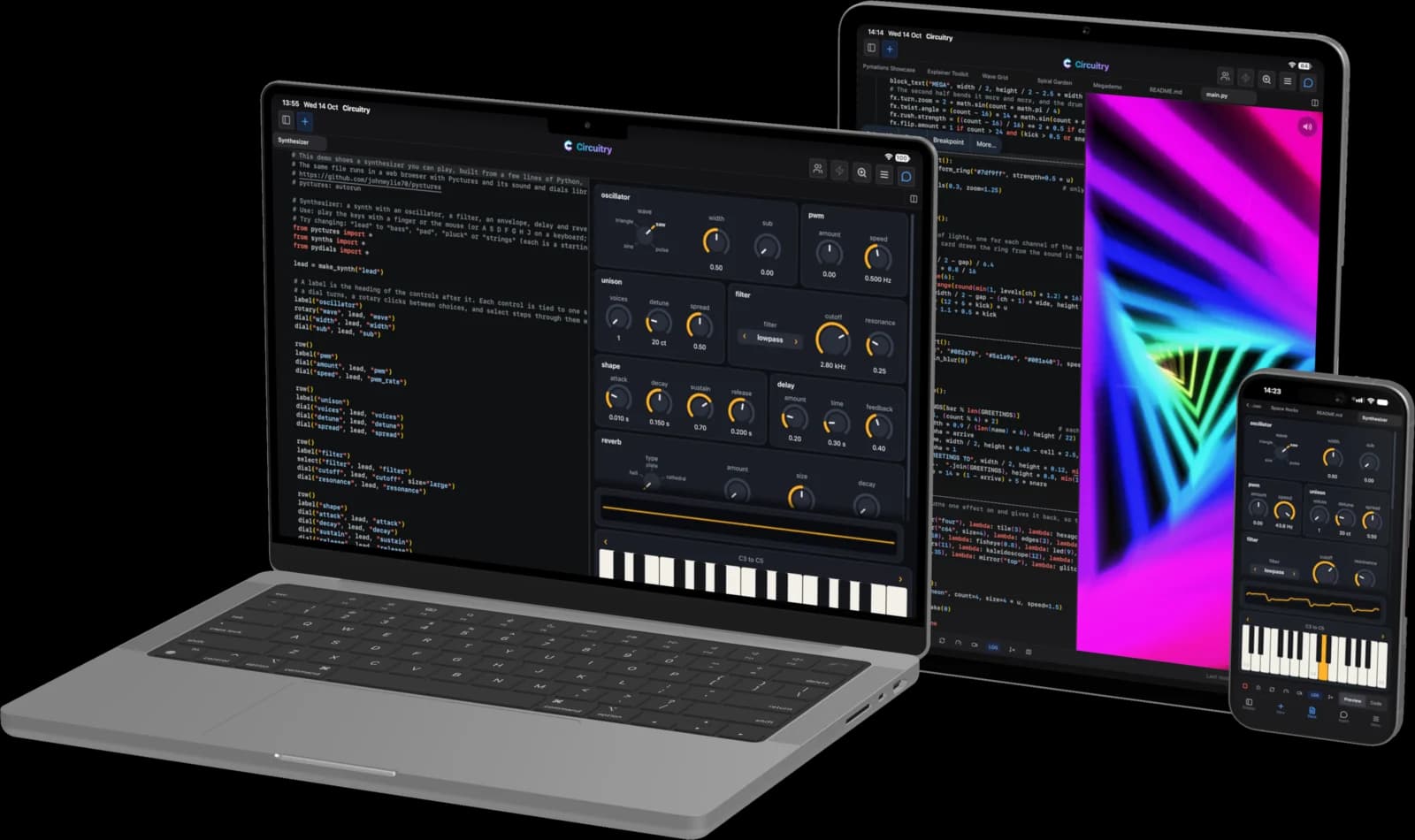
Live editing a React page
Powerful Flexible Workflows
Python on one node, an AI model on the next, and the company’s policies and FAQs for the agent to refer to. Every node has an AI wizard to fill it in, or ask for the whole workflow in the chat panel. Hit run and watch it go, then deploy it to the cloud on a webhook or a schedule.
And the same studio in your pocket.
You will be surprised how much work you get done with your phone or tablet!
Not a companion app — the same editors, the same agent, the same files.
Just ask, and the right thing opens
Just ask what you wish to create.
Get back the right editors configured, with or without AI.
Run your agents and builds on the machine at home. From an IDE on your phone or tablet.
⚡ Circuit
A small app in the menu bar or system tray of your Mac, PC or Linux box. Use the full power of your machine from an interface anywhere — sketch art on your iPad with Apple Pencil, control multiple terminal agents on your phone. All your devices working together.
Circuit requires a paid plan.

Run local models on your own machine
Agents can use open-weight models running at home, with no cloud and no API bill. On a Mac with Apple silicon, Circuit sets up MLX models for you. Ollama and LM Studio work on a Mac, PC or Linux box.
Then use them from your phone or tablet, anywhere, with Home Circuit. Local models
Connect to your Mac, PC or Linux box over your wifi.
Reach your computer at home from anywhere, safely, over any connection. Nothing to set up on your router.
A Linux machine in the cloud, for when running Circuit at home is not possible.
Software Engineering is Back!
No more prompting and hoping, serious companies need to be able to architect and visually review what’s been built. Classic UML Diagrams give architects the ability to instruct AI, and AI can read the code and logs and draw diagrams with timing data and observations and recommendations in sequence diagrams, together you can analyse and engineer systems.
Fixing problems where attention and mass of code can lose the agent and your time.
Share and collaborate with your team on any document in Circuitry.
Class · Sequence · Entity relationship · State · Flowchart · Workflow
Fun to learn.
Education
Python and JavaScript you can see, hear and play.
Circuitry is great for education too. It is a highly visual IDE with instant feedback, which is rewarding for anyone just starting out. Beginners get results in a few lines of Python or JavaScript, and that inspires them to learn more.
Diagrams, workflows, images and web pages — generated on the canvas.
Ask for it and it arrives as real objects: boxes, arrows, layers and text you can restyle, rearrange and export. Not a flat picture of a diagram — the diagram itself, with every fill, corner and line end still yours to change.
Claude Code, with eyes.
Claude Code, Gemini and Codex run right here, in real terminals on your own machine. Circle something, select it, then say what you want — what you select is what your agent sees. Code edits come back as an accept-or-reject diff.
Fix a long prompt without tapping through it.
Vim support in terminals
Fix a word three lines back without tapping through the text. Search everything that has scrolled past. Select a chunk of output and copy it out — a stack trace, a filename, a block of results — without reaching for a mouse. In the assistant’s prompt box, the code editors and the terminals alike. It’s vim editing, if that means something to you.
- On a phone, a key row above the keyboard: key groups for control, navigation, symbols and function keys, then vim shortcuts, then your own macros — a phrase you type often behind one tap.
- Off until you turn it on, with a practice trainer when you do.
Workflows that run code, images and models — on your machine as readily as in the cloud.
You place the nodes and decide how they connect, so the shape is yours; it writes what goes inside them. It does everything you would expect of an automation tool, and a good deal that has nothing to do with automation.
- Write code on a node in any of ten languages, then run it, step it and debug it.
- Every node type has its own wizard: say what the step should do and it comes back configured — code, images, data, SQL, 3D, web and the rest.
- Work on the files and images already on your disk: convert, resize, remove backgrounds, and write the results back.
- Put the same input through different AI models and compare what comes back.
- Draw it on the whiteboard and it becomes a workflow that runs.
- Export it as code, or ask the agent to implement it in your project.
- Connect hundreds of online services with thousands of operations between them, and deploy to the cloud on a schedule or a webhook.
It is part of the IDE you already have open, not a separate service to subscribe to. And it runs on your phone and tablet too.
Set a breakpoint on your phone.
JavaScript, TypeScript, Python, Lua and Ruby run on the device itself — in a CodeBook, at a REPL and inside workflow nodes, offline, with nothing connected. Set breakpoints in JavaScript, TypeScript or Python, step through, inspect the variables, and keep the scope alive from one cell to the next.
Go, Rust, C, C++ and Zig need a Circuit to compile — then they run on the phone too, as WebAssembly, and keep running offline once built. And with a Circuit connected there is no ceiling at all: the agent works on that machine, in any language, on anything you want to build.
Frontier models on our credits. Kimi, GLM, Qwen and the rest on your own key.
Claude, GPT and Gemini run on our credits or on your key. Point it at an aggregator with your own key and the wider open-weight catalogue opens up. Or run a model on your own machine. On recent Apple hardware in the app, use the on-device models with no network at all.
It reaches the folder on your disk.
Loop a folder on your own drive through AI — background removal, conversion, resizing, generation — and write the results straight back. No uploading, no per-file cloud bill. The same workflow can deploy to the cloud on a schedule, or whenever another app calls it.
Not a fork. Not a plugin.
None of the above could be added to an existing editor. A plugin inherits the seams of the thing it plugs into. It can add a panel.
It can’t make a whiteboard, a design canvas, a notebook, a spreadsheet, a workflow graph and a terminal into things one agent reads structurally and acts on — running on a phone against a machine at home. So the IDE was designed for AI, flexibility and connectivity from the start.
Remember when computers were fun?
A megademo, made in Circuitry
In the 1980s and 90s, people made demos like this on home computers, to be creative with code, graphics and sound. This one is written in Python and exported as a video to share with the world. Edit the code and the preview changes as you go, so every idea pays off straight away. That instant reward is how a generation learned to program. We built Circuitry to bring that joy back.
Free for your own projects. Paid when it earns.
The studio in the web, the app on your desk, real terminals, your own coding agent and any model you bring — free, for personal, non-commercial work.
Free
Everything on your own desk
Every editor in the web, and the desktop app as a full code IDE — your projects, your files, your terminals, your coding agent, your own models. Nothing metered — for non-commercial work.
From $9
We run the AI
Cloud models on our credits instead of your key, the build-it-for-me wizards, the agent editing your documents rather than only reading them, and workflows deployed to run in the cloud.
From $20
Off your desk, and paid work
Reaching your own machine from a phone or tablet — on the network or, with Home Circuit, from anywhere. Cloud Circuit when you want a machine you don’t own. Working alongside someone in the same document. And the licence that covers commercial work.
The same AI, in every surface.
It sees the one you’re working in.
Think with AI. Not just talk to it.
Free for non-commercial use, on your machine and in the web. No card either way.